Thanks, I will test it with B when I get back to my office.
1 Like
Looking forward to 
I haven’t used arch-cwt on VF2 for over a year since it became incompatible with StarFive’s SPL and U-Boot. 
Hi @lzzhzh
It seems you didn’t boot directly from the microSD card or the MMC, but instead booted from the SPI flash. The onboard U-Boot version (2021.10) isn’t compatible with the Arch image.
Here my boot log:
U-Boot SPL 2025.10 (Dec 22 2025 - 06:14:15 +0000)
DDR version: dc2e84f0.
Trying to boot from MMC2


U-Boot 2025.10 (Dec 22 2025 - 06:14:15 +0000)

CPU:   sifive,u74-mc
Model: StarFive VisionFive 2 v1.3B
DRAM:  8 GiB
Core:  160 devices, 30 uclasses, devicetree: board
WDT:   Not starting watchdog@13070000
MMC:   mmc@16010000: 0, mmc@16020000: 1
Loading Environment from SPIFlash... SF: Detected gd25lq128 with page size 256 Bytes, erase size 4 KiB, total 16 MiB
OK
StarFive EEPROM format v2

--------EEPROM INFO--------
Vendor : StarFive Technology Co., Ltd.
Product full SN: VF7110B1-2253-D008E000-00002103
data version: 0x2
PCB revision: 0xb2
BOM revision: A
Ethernet MAC0 address: 6c:cf:39:00:32:37
Ethernet MAC1 address: 6c:cf:39:00:32:38
--------EEPROM INFO--------

starfive_7110_pcie pcie@940000000: Starfive PCIe bus probed.
starfive_7110_pcie pcie@9c0000000: Starfive PCIe bus probed.
In:    serial@10000000
Out:   serial@10000000
Err:   serial@10000000
Net:   eth0: ethernet@16030000, eth1: ethernet@16040000
starting USB...
Register 5000420 NbrPorts 5
Starting the controller
USB XHCI 1.00
Bus xhci_pci: 2 USB Device(s) found
       scanning usb for storage devices... 0 Storage Device(s) found
Working FDT set to ff707f00
Hit any key to stop autoboot: 0
Card did not respond to voltage select! : -110
** Booting bootflow '<NULL>' with efi_mgr
Loading Boot0000 'nvme 0' failed
Loading Boot0001 'mmc 1' failed
EFI boot manager: Cannot load any image
Boot failed (err=-14)
Card did not respond to voltage select! : -110
** Booting bootflow 'mmc@16020000.bootdev.part_3' with extlinux
1:	Arch Linux
Retrieving file: /vmlinuz
Retrieving file: /initramfs-linux.img
append: root="LABEL=VF2" rw console=tty1 console=ttyS0,115200 earlycon rootwait stmmaceth=chain_mode:1 selinux=0 rootflags=defaults,discard=async,compress=lzo,user_subvol_rm_allowed,subvol=@
Retrieving file: /dtbs/starfive/jh7110-starfive-visionfive-2-v1.3b.dtb
   Uncompressing Kernel Image to 0
## Flattened Device Tree blob at 46000000
   Booting using the fdt blob at 0x46000000
Working FDT set to 46000000
   Loading Ramdisk to fd9ea000, end fe3ff63e ... OK
   Loading Device Tree to 00000000fe6b5000, end 00000000fe6c631f ... OK
Working FDT set to fe6b5000

Starting kernel ...
The Arch image intentionally uses the upstream OpenSBI and U-Boot, which results in a different DTB path (/dtbs/jh7110-starfive-visionfive-2-v1.3b.dtb vs /dtbs/starfive/jh7110-starfive-visionfive-2-v1.3b.dtb). If you prefer not to modify the onboard firmware, you can set the DIP switch to SD mode (0–1) to load the SPL and U-Boot directly from the SD card instead.
1 Like
cwt, thank you. I now know that you are using the upstream U-Boot.
Two different u-boot versions probably won’t be compatible just by setting the DIP switches. I’ll wait and hope that one day they can both change.
U-Boot SPL 2025.10 (Dec 22 2025 - 06:14:15 +0000)
DDR version: dc2e84f0.
Trying to boot from MMC2


U-Boot 2025.10 (Dec 22 2025 - 06:14:15 +0000)

CPU:   sifive,u74-mc
Model: StarFive VisionFive 2 v1.3B
DRAM:  8 GiB
Core:  160 devices, 30 uclasses, devicetree: board
WDT:   Not starting watchdog@13070000
MMC:   mmc@16010000: 0, mmc@16020000: 1
Loading Environment from SPIFlash... SF: Detected gd25lq128 with page size 256 B
ytes, erase size 4 KiB, total 16 MiB
*** Warning - bad CRC, using default environment

StarFive EEPROM format v2

--------EEPROM INFO--------
Vendor : StarFive Technology Co., Ltd.
Product full SN: VF7110B1-2253-D008E000-00001694
data version: 0x2
PCB revision: 0xb2
BOM revision: A
Ethernet MAC0 address: 6c:cf:39:00:2b:41
Ethernet MAC1 address: 6c:cf:39:00:2b:42
--------EEPROM INFO--------

starfive_7110_pcie pcie@940000000: Starfive PCIe bus probed.
starfive_7110_pcie pcie@9c0000000: Starfive PCIe bus probed.
In:    serial@10000000
Out:   serial@10000000
Err:   serial@10000000
Net:   eth0: ethernet@16030000, eth1: ethernet@16040000
starting USB...
Register 5000420 NbrPorts 5
Starting the controller
USB XHCI 1.00
Failed to get keyboard state from device 1a2c:0b2a
Failed to get keyboard state from device 1a2c:0b2a
Bus xhci_pci: 4 USB Device(s) found
       scanning usb for storage devices... 0 Storage Device(s) found
Working FDT set to ff707f00
Hit any key to stop autoboot: 0
Card did not respond to voltage select! : -110
** Booting bootflow '<NULL>' with efi_mgr
Loading Boot0000 'mmc 1' failed
Booting: Label: nvme 0 Device path: /VenHw(e61d73b9-a384-4acc-aeab-82e828f3628b,
0000000000000000)/VenHw(e61d73b9-a384-4acc-aeab-82e828f3628b,6f00000000000000)/V
enHw(e61d73b9-a384-4acc-aeab-82e828f3628b,5700000002000000)/VenHw(e61d73b9-a384-
4acc-aeab-82e828f3628b,5700000003000000)/VenHw(e61d73b9-a384-4acc-aeab-82e828f36
28b,5000000000000000)/NVMe(0x1,68-16-b6-02-04-8e-e3-8c)
ethernet@16030000 Waiting for PHY auto negotiation to complete...... done
error: no such device: writable.


                   GNU GRUB  version 2.14~git20250718.0e36779

   Minimal BASH-like line editing is supported. For the first word, TAB
   lists possible command completions. Anywhere else TAB lists possible
   device or file completions. To enable less(1)-like paging, "set
   pager=1".


grub>
This is really the best feature of VF2! The DIP switch mode 0–1 somehow almost purely electrical, forcing the board to load system firmware (SPL and U-Boot) directly from the SD card.
So you write the image to an SD card, set the DIP switch to SD mode, then you essentially bypass the onboard firmware.
1 Like
I tried to build hyprland-git with yay, but some packages couldn’t be retrieved, like harfbuzz and libjpeg-turbo, blocking the build.
Any other options to get a DE working (doesn’t need to be hyprland)?
Hyprland cannot run on VF2/VF2L, right? It is GPU-based and not supported. I cannot run it in Debian 13, but it can run on other Wayland environments (Weston, GNOME, Sway, Labwc, XFCE 4.20, LXQt).
It’s been a while since I’ve used my VF2 with the cwt image (I’ve recently been playing with the Ubuntu image). I think @leon3321 was able to run xfce4 (message number 392 in this thread) but I don’t know the steps he followed to set it up, just if you want to try to setup any X11 DM.
Another option might be Wayfire. I was able to use this one too (I don’t remember whether I installed or compiled the package) also with Hyprland. However none of them worked with GPU acceleration 
And last but not least I do remember I needed to manually compile yay and store it into /usr/bin and maybe the reason is the same one you are facing. If you want to try I do remember I went to the official GitHub repo (I think is GitHub - Jguer/yay: Yet another Yogurt - An AUR Helper written in Go) and followed the steps to compile it. I haven’t tried it but maybe you can use yay to compile any package from source if missing
Good luck! Maybe I will try to setup Hyprland by myself from the beginning with latest cwt image and give any advice if considered relevant
Thanks for the response.
I installed yay, but I had to install Go manually.
Replace amd64 with riscv64.
The issue is missing packages for RISC-V, like harfbuzz and libjpeg-turbo. The BredOS team also suspended new RISC-V images, as it seems that Arch is no longer keeping all the RISC-V packages in sync.
go, harfbuzz and libjpeg-turbo are all in the Arch Riscv repo …
Are the packages in sync (correct version)? Or is there an issue with the cwt image?
Yes, they are in sync,
No, there is no issue with the cwt image. This is just basic Arch.
Linux jagular 6.12.18-cwt-6.0.0-2 #1 SMP PREEMPT_DYNAMIC Wed Dec 24 13:56:12 +07 2025 riscv64 GNU/Linux
$ yay …
extra/libjpeg-turbo 3.1.3-1 (576.8 KiB 2.0 MiB) (Installed)
extra/harfbuzz 12.3.0-1 (1.3 MiB 4.2 MiB) (Installed)
extra/go 2:1.25.6-1 (35.5 MiB 189.3 MiB) (Installed)
$
1 Like
For any other Arch noob out there, start with the following command to sync the pacman DB.
sudo pacman -Syyu
Any suggestion for a working DE with GPU acceleration?
I haven’t had a chance to dig deeper into this, but the Pinetab V runs very similar hardware to the Visionfive 2, so much so that this Arch Linux image can boot on the Pinetab V. There is not currently Arch Linux for the Pinetab V and I find it important to bring it up to speed.
The issues I have run into:
Upon editing the boot parameters to use the correct directory Arch linux is able to boot, show output over uart, show output over microhdmi, but USB and MIPI-DSI are not working.
I believe the MIPI-DSI interface is never loaded for whatever reason, I will have to look into it.
1 Like
I had a little bit of time to investigate:
The SMART daemon fails to start with status 17, it has “no devices to monitor“, I shall ignore this for the time being.
I do believe MIPI-DSI for display out is enabled in the kernel and I am using the Pinetab-V device tree sourced from a working debian release. The backlight turns on but the display outputs nothing, maybe the display firmware needs to be built into the image?
No idea what is wrong with USB, I see logs about usb hubs being loaded they just don’t work.
I have been using linux for a long time, but I have no experience with porting devices or anything like that, but I am very willing to learn and study more.
Coexistence of archlinux-cwt25 and debian202510 on nvme
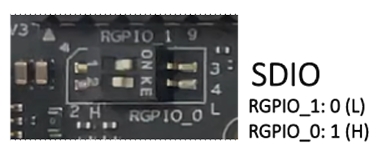


GPIO_1=0
GPIO_0=1
mmcblk1p1 = spl (starfive-debian202510)
mmcblk1p2 = u-boot (starfive-debian202510)
mmcblk1p3 = /boot (starfive-debian202510 + archlinux-cwt25)
nvme0n1p4 = / (archlinux-cwt25)
nvme0n1p6 = / (starfive-debian202510)
nvme0n1p7 = /home (starfive-debian202510)
nvme0n1p8 = / (starfive-ubuntu2404)
1 Like